Guide to the Ultimate-64
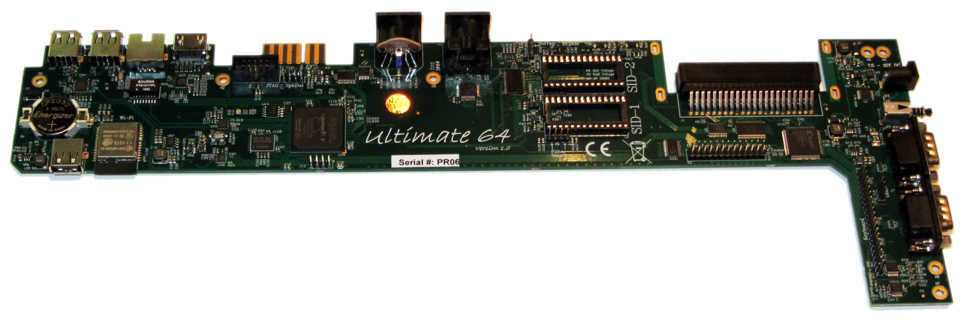
The project
I started the project some years ago, but never designed production-ready hardware for it. I picked up the pieces and merged it with the latest Ultimate-II+ code. This combination was prototyped on a product from Technolution B.V. (the company I work for); a product that uses an Altera (=Intel) FPGA and has DVI output as well as USB ports. Using a USB keyboard, I managed to type on this “thing” and load some demos from the ‘Ultimate’ drive. Many demos and games seemed to work flawlessly. From there, I decided I should first create the hardware platform with all the required I/O, such that I could do better tests. The result of this is shown in the first prototype, as shown in the picture above.
Basic operation
Menus
The Ultimate-64 provides a user friendly menu driven interface, which
can be accessed by pressing the multi button (power) briefly. Pressing
this button will interrupt the currently running program on the C=64 and
show the menu. Leaving the menu will resume the C=64 gracefully.
The main three functions of the menu are:
File selection (normal mode)
F2brings up the Settings of the Ultimate 64F5brings up the Tools menu
File selection menu
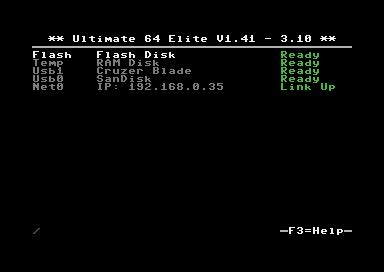
The menu starts with showing the available network interfaces, and the storage devices that are attached to the cartridge. By default, it will only show the built-in Ethernet port. When USB-sticks are inserted, one or more items will appear in this list. This screen is the ‘root’ of the file system.
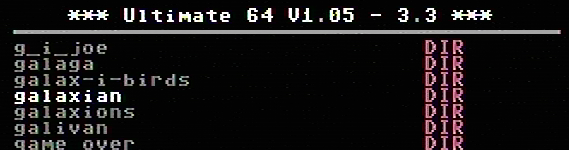
Use the cursor keys to navigate through the file system and select your file (disk image) to mount. The highlighted line shows the current selection.
F2 - Settings menu
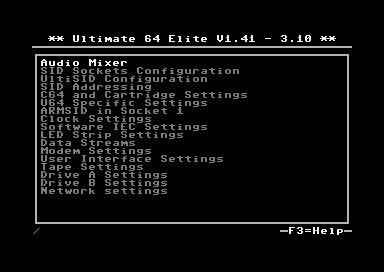
U64 Specific Settings
Menu name |
Explanation |
Options (bold default) |
|---|---|---|
HDMI Scan Lines |
This setting emulates the well know scanlines of that where visible on CRT (old) display. Every line is drawn twice. The second line that the Ultimate64 outputs is either a dimmer version of the previous line, or a full brightness line. The dim line gives an awesome CRT effect, while the exact copy of the previous line gives a crisp solid image. |
Disabled Enabled |
Digital Video Mode |
HDMI or DVI output via HDMI cable |
DVI HDMI |
SpeedDOS Parallell Cable |
Enable this when using a parallell Kernal and Drive ROM |
Disabled Enabled |
SID in Socket 1/2 |
Choose what type of SID you have in Socket 1/2. fpgaSID emulates a SID chip. sidFX is a hardware addon. |
None 6581 8580 sidFX fpgaSID |
SID Player Autoconfig |
?? |
Disabled Enabled |
Allow Autoconfig uses EmuSid |
?? |
Yes No |
SID Socket 1/2 Address |
This sets the address the SID chip responds to. The addresses with ranges (ie: $D400-D7FF) will respond to commands at any address in that range, repeating every 32 bytes. The standard Commodore 64 SID starts at $D400, and many stereo SID programs expect the second SID to be at $D420 or $D500. You can configure the start address of the two SID sockets and the two emulated SIDs separately, for up to 4 SIDs and 12 voices. |
$D400-$D7FF $D400-$D5FF $D600-$D7FF $D400-$D4FF $D500-$D5FF $D600-$D6FF $D700-$D7FF |
Paddle Override |
When paddle override is on, the U64 will always read the internal paddle registers, regardless of the address settings and which SID is mapped where. |
Disabled Enabled |
Ext StereoSID addrline |
?? |
A5 A8 |
UltiSID 1/2 Address |
This sets the address of the emulated SID. Use $D400 (not $D400-XXXX) to emulate the standard C64 SID, or set an alternate start address to use the emulated SID as a second SID for stereo SID players. |
$D400-$D7FF $D400-$D5FF $D600-$D7FF $D400-$D4FF $D500-$D5FF $D600-$D6FF $D700-$D7FF |
Adjust Color Clock |
With this settings the color clock pulses can be controlled. Value range: between -100 ~ +100 ppm |
0 -100 to +100 |
Analog Video |
Choose type of output over Legacy Video port (DIN Plug). The analog video output can be set to 2 different modes CVBS + SVideo This is the same output that the original Commodore 64 uses. RGB This is a U64 setting which outputs the video in separate signals. These signals are Red,Green and Blue, these can be used to make a video cable to scart. |
CVBS + SVideo RGB |
Chroma Delay |
Amount of time for the Chroma signal to delay. With this settings the Chroma (color) data can be delayed. This can be helpful if there is some bleach in the color output. |
0 -3 to +3 |
Vol EmuSid1/2 |
Volume for emulated SID chip 1/2 The analog SID audio is passed through to the HDMI and DIN video jacks. |
0dB -42dB to +6dB Off |
Vol Socket 1/2 |
Volume for SID chip in socket 1/2 Emulated SID audio is passed through to the HDMI and DIN video jacks. |
0dB -42dB to +6dB Off |
Vol Sampler L/R |
Left / Right output volume of the DA converter (soundcard), for example the mod files player. |
0dB -42dB to +6dB Off |
Vol Drive 1/2 |
Output volume for Ultimate 1541 drive 1 and 2, this is the mechanic sound you hear when loading or saving data on the drive, and will be mixed in to the output. |
0dB -42dB to +6dB Off |
Vol Tape Read / Write |
Output volume of emulated Tape Read / Write sound mixed into Sound output. This will also send the sound from an external Tape deck (1531) through your speakers. |
0dB -42dB to +6dB Off |
Pan EmuSid1/2 |
Panning for emulated SID chip 1/2 |
Left 1-5 Right 1-5 Center |
Pan Socket 1/2 |
Panning for SID chip in socket 1/2 |
Left 1-5 Right 1-5 Center |
Pan Sampler L/R |
Panning for Sampler Left / Right |
Left 1-5 Right 1-5 Center |
Pan Drive 1 / 2 |
Panning of the Ultimate 1541 Drive sound mixed into Sound output |
Left 1-5 Right 1-5 Center |
Pan Tape Read / Write |
Panning of the emulated Tape Read / Write sound mixed into Sound output |
Left 1-5 Right 1-5 Center |
U64 Specific Settings
Clock Settings
The U64 has a internal clock that is powered with a battery to keep track of the date & time.
With this setting the following values can be changed:
Year
Month
Day
Hours
Minutes
Seconds
Correction This corrects the deviation of the internal clock (RTC)
Software IEC Settings
IEC Drive and printer
Soft Drive Bus ID
Default Path
Printer Bus ID
Printer output file
Printer output type
Printer ink density
Printer Emulation
Printer Commodore charset
Printer Epson charset
Printer IBM table 2
C64 and cartridge settings
Cartridge
Final Cartrdige 3 Mode
Fast Reset
Alternate Kernal
Alternate Basic
Alternate Chargen
RAM Expansion Unit
REU Size
REU Preload
REU Preload Image
REU Preload Offset
Map Ultimate Audio $DF20-DFFF
DMA Load Mimics ID
Command Interface
UltiDOS: Allow SetDate
User Interface Settings
Interface Type
Background color
Border color
Foreground color
Selected Item color
Selected Backgr ( Overlay )
Home Directory
Enter Home on Startup
Tape Settings
Tape playback Rate
1541 Drive A & B Settings
1541 Drive Bus ID
1541 ROM Select
1541 RAM BOard
1541 Disk swap delay
1541 Resets when C64 resets
1541 Freezes in menu
GCR Save Align Tracks
Network settings
Use DHCP
Static IP
Static Netmask
Static Gateway
Host Name
F5 - Tool menu
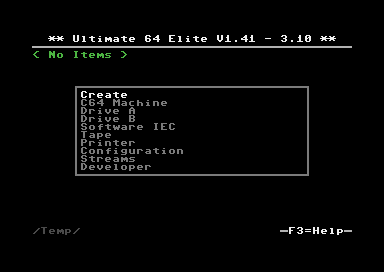
Ultimate64 features
More about mounting disks
Remember that ‘mounting’ a disk means creating a link between the 1541 part of your ultimate cartridge, and a file on a storage device. This means, that when the link has been established, “writes” that the 1541 performs will be written back into the disk image file as well. In this way, the ‘real’ behavior of a floppy is emulated.
This behavior will not always be what you want. There are two options to avoid this: ‘mount’ the floppy as read-only, or ‘mount’ the floppy in ‘unlinked’ mode. When write protected, the drive itself cannot write to the floppy. In unlinked mode, the writes to the floppy are performed, but do not reflect in the .D64 or .G64 file. When the storage device is removed, the 1541 drive automatically switches to unlinked mode. Be aware that writes to the disk will then be lost when you turn off the machine.
You can write the current unlinked floppy image back to your USB device at any time from the F5 menu.
HDMI port
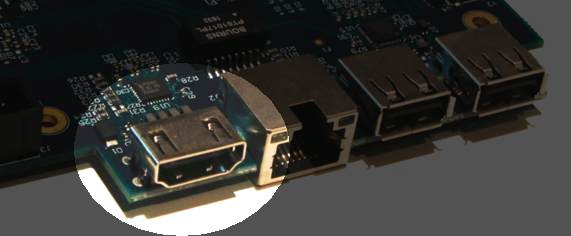
The HDMI port can be connected to a modern display ( eg. television ), so you can use the Ultimate-64 in the future.
Resolution of the HDMI output
The output resolution is 720 x 576 at 50 Hz (for the PAL version), also noted as 576p50. This is a standard resolution that all HDMI capable screens are supposed to support, according to the CEA-861 standard. However, to meet the exact timing of a C64, the timing parameters of this video mode are slightly modified. I have not come across screens that do not accept the generated HDMI signal.
Frame delays of the digital HDMI port
None. There is no frame buffer, so there is no need to worry. Some screens, especially non-gaming screens, may introduce some latency. I observed this with a 4K screen that actually resampled the output to just 30Hz. Computer monitors should have less latency, and with “game mode” turned on, latency can be reduced to one frame (20ms) or less.
Because there is no frame buffer, scrollers and such are perfectly smooth. If the TV renders the image at the speed it is sent over the HDMI link everything will be smooth.
If HDMI is used for output, there is also output generated on the PAL output ( display connector ).
In the configuration menu you can change several setting regarding this port.
U64 Specific Settings
HDMI Scan lines
User Interface Settings
Interface Type ( overlay mode )
Overlay mode causes the Ultimate menu to be displayed in the bottom-right corner of the screen and only on the HDMI or DVI display. If you unplug the HDMI cable and press the Ultimate button, the Ultimate menu will revert to being displayed full screen on the analog output.
If you need to disable the overlay view but can’t (or don’t want to) unplug the HDMI cable, you can use turn overlay off with:
Ultimate Button
Down 4x
Right 2x
RUN STOP 2x
Ethernet port
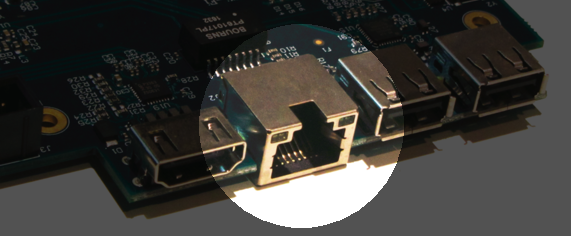
The ethernet port can be connected to a switch ( or hub ) to communicate with the Ultimate-64 over your own network.
In the configuration menu ( Network settings ) you can change several setting regarding this port.
Some of you may be familiar with the RR-net solution that brings Ethernet to the C-64. Currently, the built-in Ethernet port does not provide RR-net compatibility. However:
The Ethernet port is used natively by the firmware. There is some primitive support for file-transfer using FTP (needs improvement), and it is possible to connect to the Ultimate-II+ using a VT-100 terminal program on the Telnet port (port 23). This gives the possibility to control the machine remotely, and swap disks without actually interrupting the program running on the C-64.
USB support
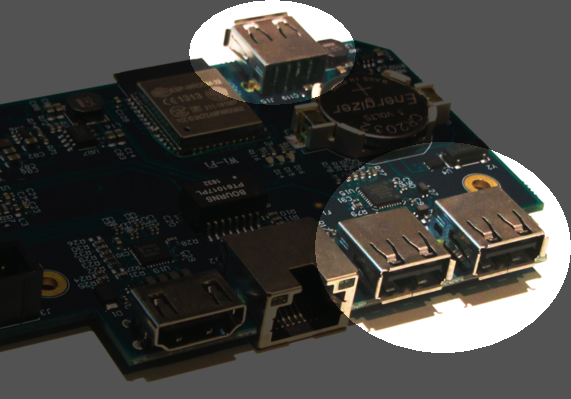
The Ultimate-64 supports most USB sticks and Flash card readers out of the box. It also supports USB 2.0 Hubs. It is recommended to use powered USB hubs only (with an external power supply). USB 1.1 Hubs are not supported.
There are three USB 2.0 ports available on the board; two on the back and one on the “internal” side of the board/case.
Please note that the port on the left is not a USB 3.0 port. Although you may use this port as a 2.0 port, it is not USB 3.0 compliant. The extra signals on a USB 3.0 connector are used to communicate with the tape port (see below). Please do not attempt to attach a USB 3.0 device to the blue USB connector on the Ultimate-II+. You may safely use a USB 3.0 device on the right side of the cartridge.
File Systems
Currently, the Ultimate-II+ supports the FAT16/FAT32 file system on any storage device, and the ISO9660/Joliet on CD/DVD ROM drives, or ISO files. It is able to read D64 files, as well as D71 and D81 files (no partitions), T64 files.
Supported file-types
The Ultimate-64 can open / mount several file-types:
PRG
D64
DMA loads
The Ultimate-II+ is capable of loading files directly through the cartridge port into the memory of your C=64. This is called DMA load. The menu supports loading files of the .PRG type only. It doesn’t matter if the PRG is located on the FAT/ISO file system, or inside a disk image (.D64), or inside a tape archive (.T64). Be aware that a lot of programs inside a .D64 file require that the rest of the disk is mounted in the drive. For those programs, use the ‘Mount & Run’ command.
Tape Support
The Ultimate-64 is capable of emulating a cassette tape deck (CBM1530/1531).
In order to play a tape, browse in the menu to a .TAP file, and press enter and select “Play Tape” from the popup menu. This will initialize the tape streamer from the start of the tape. Use functions in the main menu (F5) to pause/resume playback. It is also possible to write the .TAP file to a real tape, using a CBM1530/1531 deck.
The Ultimate-64 can also capture tape signals into a .TAP file. The ‘F5’ menu will show you the available options.
Joystick ports
Joystick
Mouse
Paddles
Light(pen/gun)
Cartridge support
Cartridge slot
Cartridge Emulation
Because the Ultimate-II+ will occupy your cartridge slot, a list of popular expansions available for the C=64 are integrated into the Ultimate-II+. These expansions include cartridges such as the Action Replay, Retro Replay, The Final Cartridge III, Super Snapshot V5, KCS Power Cartridge and the Epyx fastloader. In the configuration menu, even the CBM1750/1764 RAM Expansion unit can be enabled, with expansion RAM up to 16 MB!
Many of these cartridges have a reset button and a freezer button. This is the function of the other two buttons on the Ultimate-II+. By default, the left button is the freezer button, and the button on the right is the reset-button. Through the configuration menu, the buttons can be swapped if desired.
Does the Ultimate 64 support external cartridges?
Yes, the cartridge port is fully supported.
So I an insert an Ultimate-II+ module and have an awesome system? :-)
You could, but you don’t need to. The Ultimate-II+ is fully integrated into the Ultimate-64 board.
Oh, but how is this possible? You mentioned I can use external carts?
You could see it as a port extender. Obviously, you cannot use the same features of the expanded port at the same time. But, you can, for example, use the REU from the build-in Ultimate-II+ function, together with an external music cartridge, or utility cartridge that allows some registers at $DF00. And of course, when you turn off all cartridge emulation features of the Ultimate-II+, the cartridge port is free to use.
Ultimate Audio module
The Ultimate Audio module provides 8 simultaneous sampling voices. This module is utilized as part of the Ultimate-64 firmware for playing Amiga MOD files. This option is available in the context menu in the file browser.
If you like to do some programming yourself using this sampler, you can enable this module in configuration menu. It then appears in the I/O region. The programming interface is fully documented. Documentation can be downloaded from the official website:
http://1541ultimate.net/content/download/ultimate_audio_v0.2.pdf
Alternate ROMs
In order to use an alternate ROM, browse in the file system to the binary ROM file that you like to use. The file should have the ‘.bin’ or ‘.rom’ extension. When you press enter, and the file is of the correct size, the option will appear: “Use as..”. Kernal ROMs should be exactly 8K, and drive ROMs should be exactly 16K or 32K.
NOTE: When you use an invalid file as Kernal replacement, the C64 will no longer boot. However, even when the C64 gives a black screen, you can still enter the configuration menu in order to disable the Kernal replacement option.
Software IEC
The Software-IEC module is a serial bus service that can be enabled in the configuration menu. This module provides two additional devices on the Commodore serial bus; the IEC bus:
Virtual drive that gives direct access to the Ultimate-II+ file system;
A virtual printer
Printer
The virtual printer is a valuable contribution created by René Garcia. It takes printer commands from the Commodore 64, and creates a black and white image of the printed graphics and text. This image is then saved to the USB flash drive. The full documentation of the printer emulation and all of its capabilities and options is available here:
http://1541ultimate.net/content/download/mps_printer_emulation.pdf
Virtual drive
The virtual drive can only be used to access files of the file system, through the OPEN/CLOSE commands on the IEC bus. By default, the path of the IEC drive is ‘/Usb0’, which is the top most USB connector on the right of the unit. This default path can be changed in the configuration menu. When the USB drive contains a program ‘TEST.PRG’, it can be loaded with the basic command LOAD”TEST.PRG”,10. Similarly, you can save your programs with the SAVE command. When loading the directory (LOAD “$”,10), the path will be shown as disk name.
The command channel 15, can currently only be used to change the current directory. Just like on modern systems, “..” is the parent directory and “/” is the root directory:
OPEN 15,10,15,”CD:/USB1/MYPROGRAMS”:CLOSE 15
At this point, the virtual drive is not JiffyDOS compliant.
Ultimate Command Interface
Since some time, it has become possible to control the Ultimate-64 programmatically through the I/O port of the C64, thus from a program that runs on the machine. This is useful for many things; for example it can be used to access the file system much faster than through the serial bus. But it can also be used to load files from the file system into REU memory for example. The set of commands grows over time and will provide more and more powerful features.
Documentation of the interface itself is available here:
http://1541ultimate.net/content/download/command_interface_v1.0.pdf
Accessing the file system is done through the “DOS” target, which is documented here:
http://1541ultimate.net/content/download/ultimate_dos_v1.0.pdf
Tape Support
The Ultimate-64 is capable of emulating a cassette tape deck (CBM1530/1531).
In order to play a tape, browse in the menu to a .TAP file, and press enter and select “Play Tape” from the popup menu. This will initialize the tape streamer from the start of the tape. Use functions in the main menu (F5) to pause/resume playback. It is also possible to write the .TAP file to a real tape, using a CBM1530/1531 deck.
The Ultimate-64 can also capture tape signals into a .TAP file. The ‘F5’ menu will show you the available options.
Real Time Clock
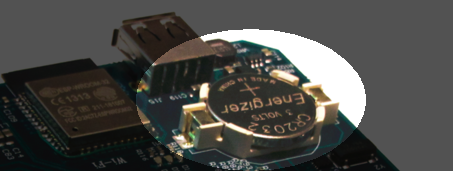
For getting correct time stamps on the files that are created on the USB pen drives, the Ultimate-II+ offers a real time clock (RTC) function. This RTC can be set through the configuration menu.
The RTC is powered by a CR2032 battery, which is located inside of the unit. Calculations show that the lifetime of this battery is several years.
Video connector
The 8-pin DIN ( video ) connector can output several different output signals, for each output you need a special assembled cable.
Output signals
Composite ( CVBS ) ( PAL )
S-Video ( PAL )
RGB ( PAL )
The Composite and S-Video cables are the same as you use for the original Commodore 64.
NTSC
NTSC will work on all modern screens because they support 576p for PAL as well as 480p for NTSC.
Full NTSC compatibility will be implemented in the near future, the hardware can handle this without problems. It will be an software (firmware) update, so a setting will come available in the configuration menu.
Is the tape port supported?
Yes.
How do I connect the Ultimate-II+ tape adapter then?
You don’t need to. The emulated tape drive automatically ‘connects’ to the tape pins when playing TAP files.
How about the User Port? On the picture it seems that the User port is no more.. Boo hoo!
You’re right, the User Port is no longer avaiable at the original position. However, all signals from the User Port are available from a pin-header on the board. It is therefore possible to create an extension cable that brings out the user port.
So, as the Ultimate-II+ is integrated, it comes with the emulated floppy drive, correct?
Yes, that is correct.
And, I don’t need to connect an external IEC cable to make use of this drive?
No, that is no longer required, because it is all inside of one chip.
Does the board have Ethernet?
Yes, just like the Ultimate-II+, the Ultimate 64 will also have an Ethernet port. Even more so, the plan is to release a version with WiFi as well at a modest higher price.
Buttons? The Ultimate-II+ had buttons, but they seem to have gotten lost.. How do I…?
Relax.. There is still one button, in the place of the original power switch. This momentary switch is used to turn on the power and get into the Ultimate menu. Reset and freeze are implemented by holding the button and/or hitting the RESTORE key. You can turn off the machine from a menu option, or hold the button for 4 seconds..
SID Chips
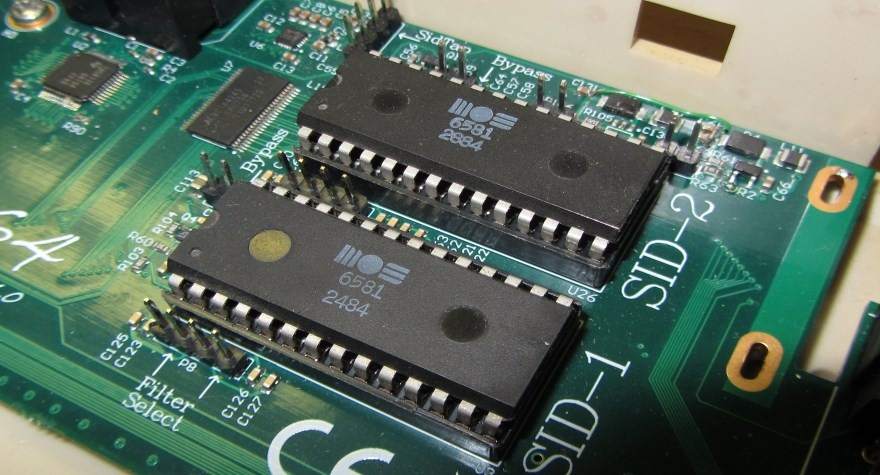
The Ultimate-64 does have support for 2 REAL SID chips that can be placed in the SID-1 & SID-2 sockets.
THE REAL THING!
Audio purists want REAL chips because the those chips are analog, they sound warmer (fatter) than an FPGA emulated SID.
It supported both 6581 as well as 8580 chips. The voltage for these chips is set by jumpers, as well as the external filter components.
It is not software controlled because the chips can not switched on the fly.
SID output on HDMI
The output of both SID chips are digitized on the board and the digital samples are merged with video into the HMDI stream.
NO AUDIO ?
The Ultimate-64 has an internal SID FPGA SID emulation onboard which can generate the audio signal, so it works fine without REAL SID chips. So if you do not have REAL SID chips, you stil have audio.
User port
Installation
U64 mainboard
Firmware Updates
Supported files types
Disclaimer
The ‘firmware’ on your Ultimate-64 board consists of a rather large number of functional parts that all work together. Although an insane number of hours have been put into testing and improving the firmware and software, I am very certain that it still has bugs. Some testing work still needs to be done. The device will be improved further as time passes. Check the download section at the website for the newest firmware version. We believe in the end this will sure be the ‘ultimate’ replacement for your 8-bit Commodore 64 computer.
Known issues
Notes van Gideon
https://1541u-documentation.readthedocs.io/en/latest/
Volgens mij is er per menu item een aantal dingen belangrijk. Een algemene beschrijving, wat doet het, wat kun je er mee, een gebruiksvoorbeeld, en wat zijn de eventuele beperkingen En eventueel referenties naar de externe manuals, zoals bijvoorbeeld van de cartridge ROMs. Of manual van de REU, etc.
Social Media
For quick answers to many questions regarding your device, you may be interested to join the the Facebook group “1541 Ultimate”.